

Welcome Hub
Congratulations on being offered a place on a course with us.
Welcome to Dundee and Angus College!
To help you get started with college life, we’ve put together this Welcome Hub. Below you'll find everything you need to prepare for joining us.
In the following video, Simon Hewitt (Principal) and Julie Grace (Vice Principal) highlight our amazing support teams at D&A College.
Accepting your Offer
Once you've received your offer of a place, please ensure you accept this and complete enrolment via our Onboarding, which opens in July.
Funding
You must apply for funding to cover course fees and materials every year that you study. HNC/D students should apply to SAAS for grant and loans, all other full-time students should apply for an EMA/FE Bursary. You might also be able to get extra support while you study, so check out our Funding Information page to see what you could be eligible for.
Resources
Have a look at the How to Videos and Induction Essentials below to help you complete Onboarding, access the College systems and prepare for your studies.
How to... Videos
Watch the short video below to find out how to access College emails.
Watch the short video below to find out how to access the College Guest Wifi.
Watch the short video below to find out how to access College systems.
Watch the short video below to find out how to access and use Microsoft Teams.
Watch the short video below to find out how to access and use OneDrive.
The following video will explain the process of changing your College password when in Onboarding.
Watch the short videos below to find out how to contact your tutor or student rep.
Watch the short videos below to find out how to download and use My D&A Life, explore what is in the app and how to check your attendance.
If you have completed an application and you have received an unconditional offer from us, please watch the following video to help you through the enrolment process:
Watch the short videos below to find out how to log an absence request, update your personal details, check your attendance, and use MyD&A Attributes.
The MyD&A Life App allows you to update your personal, emergency and address details. To find out how to do this, watch the video below.
Watch the short video below to find out how to encrypt a USB device.
Watch the short video below to find out how to get your username or Student ID number. Your Student ID number is the 7 digit number shown below. Your Student Username is the 7 digits followed by @dundeeandangus.ac.uk.
Watch the short video below to find out how to order, collect and return library books and click and collect stationery
Watch the short videos below to find out how to create a new password, if you wish to change it, or how to reset your password if you have forgotten it.
Watch the short videos below to find out how to set up Multi-Factor Authentication (MFA) using your mobile phone or the Authenticator app.
If you need any further help or assistance, please contact us on digital@dundeeandangus.ac.uk
Watch the short video below to find out how to upload your photo for your Student ID card.
Induction Essentials
My D&A Life is your personalised student dashboard, giving you up-to-date information about your College life.
You'll be able to update your personal information and easily access your timetable, course details, attendance records, assignment deadlines and results, as well as the newsfeed and emails.
My D&A Life is available as a desktop site and as mobile app versions, so you can check your information at any time.
Download now to have a look around and upload your details before you join us.
- The desktop version is available at https://dundeeandangus.myday.cloud/
- Android version available on Google Play at https://play.google.com/store/apps/details?id=cloud.myday.dundee&hl=en
- iOS version available on the App Store at https://apps.apple.com/gb/app/my-d-a-life/id1526652984, or search for “My D&A Life”.
Your student card will be ordered once you have completed your registration (Onboarding) and will be delivered to your home address.
Your card has your ID Number on it; this is your College network username. It can be used to access your printing and borrow a laptop from our laptop cabinets.
Note that replacement cards are charged at £5 each.
How do I upload my photo?
You have until the 31st of July to upload your photo; otherwise, if you have an existing College photo, this will be used. Returning students can upload a new photo for their new card, as long as this is completed by the July deadline.
If you are new to College and you miss this deadline, you can either upload a photo via Onboarding or visit one of our Help Points to get this sorted.
Your photo has to be of an acceptable passport style. Please review the information below before uploading your photograph. Unacceptable photos delay the production of your card, and you may not have it by the start of your course if we need to request another photo.
Please read the following carefully before taking and uploading your photograph.
The photograph file must be:
- File type .jpeg or .jpg (Convert other file formats by opening with MS Paint and saving it selecting ‘Save as type: JPEG’)
- File size not larger than 50KB (if you cannot re-size the photograph yourself, don’t worry, we can do this for you).
Examples of acceptable photographs:

The photograph must be:
- Only you are visible; there are no other people or objects in the photograph
- You are facing forward and looking straight towards the camera with a neutral or relaxed expression
- Your eyes are open and clearly visible (no glare on eyeglasses, no sunglasses, no heavily tinted glasses and no hair across your eyes)
- Your hair is not covered unless for religious beliefs or medical reasons (no hats or hoodies)
- Your face is not obscured
Examples of unacceptable photographs:

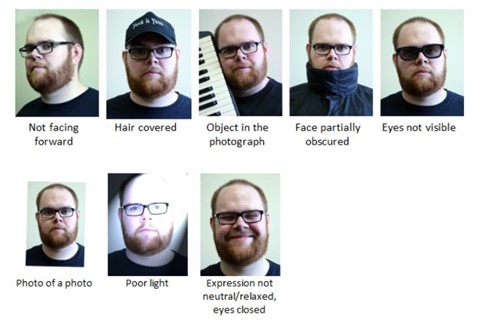
If you have no suitable photograph or can’t upload one, then we can take a photo for you in College; please visit any Help Point.
What password do I use for Onboarding?
To access Onboarding, if you have studied with us within the last 12 months and your student ID remains the same, please use the College password that you used to access College systems.
If you have forgotten your College password, watch the short video below.
If you don’t have a College account, please use the password that was in your original Onboarding email. It will look similar to this: 78TT12jji75qQ
Under 22s Free Bus Travel
Young people under 22 are entitled to free bus travel in Scotland.
If you're aged 5 to 21, you can travel on buses across Scotland for free.
Your Student Card also works as your National Entitlement Card (NEC), giving you access to free bus travel. To make sure each journey is recorded, you'll need to have your NEC with you and tap it when you board the bus.
Don't forget your card. No NEC, no free travel.
Get to know our campuses before your course starts. Find out where to go, how to read your timetable, and how to find your classroom.
Watch the short video below to learn how to find your classroom using the My D&A Life app and understand our room numbering system.
Check out our videos showing how to get to our campus Help Points.
Find out how to access the College’s ICT systems, reset your password and download a free copy of Microsoft 365 to your device.
We know that attending and taking part in your classes gives you the best chance of achieving your qualification. However, there may be times when you are unwell or medically unable to attend or participate.
Bursary/EMA Payments
Your funding payments are subject to fully engaging and attending, if necessary, 100%. Should your tutor report that you have not fully engaged or your on-site attendance falls below 100%, you may not receive a payment for that week. It is therefore important that you follow the instructions below on reporting absences. A payment schedule is included with your award letter and a copy is stored within your mailbox of your online application.
All absences must be reported to your group tutor on the first day of your absence via MyD&A Life. Videos on how to access and use MyD&A Life can be found in the How to... Videos.
Certificate of Absence
You should complete a certificate of absence by logging into your MyD&A Life account. This must be submitted within 5 working days from the first day of your absence. Absence due to the illness of someone other than yourself is only acceptable if the absence is due to the illness of an adult or child dependant.
You have a maximum of 21 certified absence hours from August – mid-January (Semester 1) and a further 21 hours from the end of January – June (Semester 2).
Watch the video below to find out how to log an absence.
Medical Certification
Should any absence be more than 5 working days a medical certificate/fit note from a doctor will be required. This must be submitted in person or by email to the Campus Help Points (heretohelp@dundeeandangus.ac.uk) within 5 working days of your return to studying. A maximum allowance of 1 week per semester can be used for this type of absence.
Please note that some doctors now charge a fee for providing medical/fit notes. It is the student’s responsibility to pay for this.
Failure to submit the appropriate certification may result in payments being withheld.
Appointments
All appointments with the doctor, dentist etc must be made out with your timetabled hours of study. If you deem it necessary to attend this type of appointment, you must cover this absence with a certificate of absence. The only exception to this is where the appointment cannot be rescheduled, i.e. hospital/court appearances. For these, you must provide evidence to the Campus Help Points within 5 working days of the appointment taking place.
As a student at Dundee and Angus College, it's important to understand the key policies, procedures, and quality processes that help create a safe, supportive, and high-quality learning experience for everyone.
Student Quality Induction and Our Charter
Our Student Quality Induction and Our Charter reference pack provide essential information for new students and outline the standards and expectations set by Dundee and Angus College.
Our goal is to create a learning community where everyone feels safe, supported, and respected.
The pack is designed to provide clear guidance on the values we uphold, the support available to you, and how you can help maintain a space where all students can thrive - both academically and personally.
College Policies and Guidelines
Managing your money is especially important when you’re a student. Find out more about fees, finance and funding.
It's important to keep yourself, your data and your college work safe and secure. Cyber Resilience and You! is an online course launched by the Scottish Government covering many cyber security topics that are important to students and includes practical examples. Click here to take this free course and keep yourself safe online.
A Personal Emergency Evacuation Plan (PEEP) is a plan designed to help people who may need extra support evacuate a building safely during an emergency.
A PEEP may be required for anyone who regularly uses College buildings and needs additional assistance to leave the building quickly and safely. This could include students or staff with a disability, a temporary injury, or a medical condition that affects their mobility or ability to respond in an emergency.
Our PEEP online course explains the emergency evacuation procedures in place across our campuses and provides guidance on the support available to help ensure everyone can evacuate safely.
Support Teams
At D&A, college life is about more than just classes. Whether you’re up for joining social activities, building your employability skills, or need a bit of extra support or advice, one of our support teams will be able to help. Meet each team and find out what they do below.
Meet the teams
Digital Services have a base on every campus, making sure that your learning is supported, your devices run smoothly, and any issues you may have are resolved quickly. Watch the video below and visit our Digital Services webpage to find out about our full range of resources and services.
Our Help Points are here to help with any questions you may have from pre-application all the way through to graduation.
Learner and Community Engagement aim to make your time at college fun, memorable and successful by creating opportunities for you to get involved in a range of activities and events. Watch the video below to get a flavour of just some of the things you could get involved with.
Our Students' Association is your megaphone, helping you to shape the student experience for yourself and future students. To find out more about how we can represent you, our activities, and "Thrive" - our cost-of-living support campaign, watch the video below and visit our Students' Association webpage.
Our Student Services team is here to help you with all aspects of college life, from your funding and course choices to additional support needs. Find out about everything Student Services can help with on this page.
We hope you’ve found this information helpful.
College life is an exciting new chapter, and we're here to support you every step of the way.
Get involved, make the most of the opportunities available, and remember that help and advice are always on hand when you need it.
We wish you every success during your time at Dundee and Angus College.
Get in touch!
If you can't find the information you're looking for on this page, you can contact our Help Points who will be happy to guide you.